

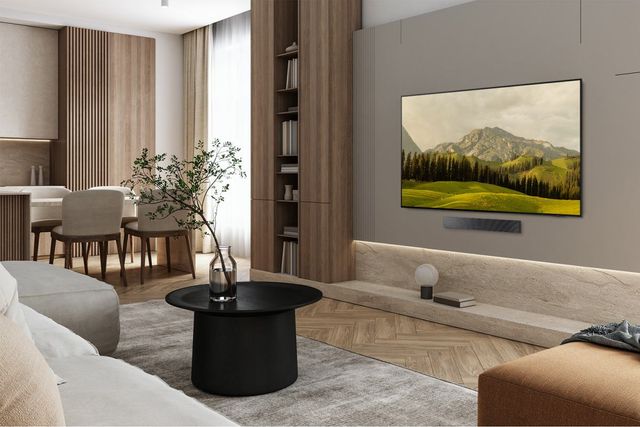
The new TV looked huge in the box. Then it went up on the wall above the sectional, and suddenly the score in the corner of the game was a blur from the couch. Your guests lean forward during movie night, and the room still feels like it has a small window instead of a screen. That gap between how big a 60 inch TV sounds and how it actually looks in your space is where most sizing mistakes start.
The good news is that the math behind screen size is simple, and our team at Spencer's TV & Appliance has already worked it out for you. This guide covers the real width and height of a 60-inch screen, how far to sit, and how to match the size to your room and seating. You will also find a side-by-side size chart, the picture features that matter as much as size, honest pros and cons, mounting tips and our top living room TV picks.
Key Takeaways
- A 60-inch screen is about 52 inches wide: It stands roughly 29 to 30 inches tall without a stand, so your console and wall space need room for both.
- Sit about 6 to 8 feet away: That range fills your view the way theater and video experts recommend, and 4K detail lets you sit at the closer end.
- Distance matters more than square footage: Measure from your main seat to the wall before you choose a size.
- Many brands now skip the 60-inch class: Most current lineups jump from 55 to 65 inches, so a 65-inch model is often the closest match.
Find the Right TV Size for Your Living Room
Compare screen sizes, viewing distances and the latest OLED and Mini LED models with help from a local Phoenix-area team. Spencer's TV & Appliance offers expert advice, delivery and professional TV mounting across the Valley.
How Big Is a 60 Inch TV? Actual Width, Height and Depth
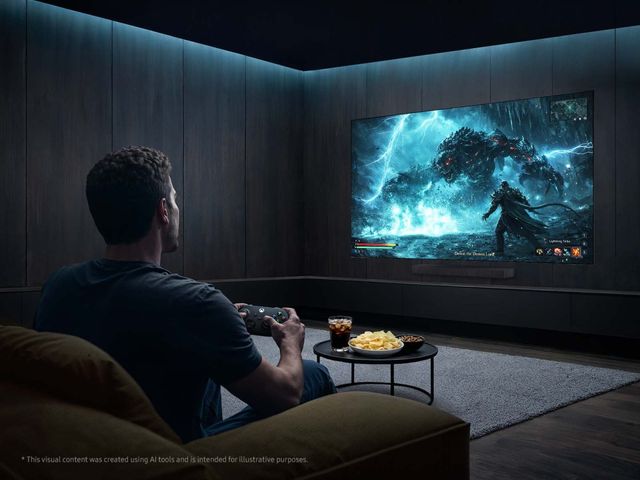
TV size is measured diagonally, from one corner of the screen to the opposite corner. The number on the box does not tell you how wide the TV is, and width is what decides whether it fits your wall or console.
Here are the approximate numbers for a 60 inch TV with a standard 16:9 screen:
- Screen width: About 52 inches (132 cm).
- Screen height: About 29 to 30 inches (75 cm) without the stand.
- Panel depth: Roughly 1 to 3 inches, depending on the panel type.
- Height with stand: Usually 32 to 34 inches (81 to 86 cm).
- Stand footprint: Often 10 to 14 inches deep (25 to 36 cm).
Why Models Differ
Bezel width, stand style and panel depth change by brand and series. OLED panels can be thinner than an inch at the edges, while some LED models are a few inches deep. Always check the spec sheet on the product page before you buy.
Stand style matters more than most people expect. A center pedestal sits in the middle and works on a narrow console. Feet placed near the edges of the screen need a surface almost as wide as the TV itself. A 60-inch set with edge feet can need a console close to 50 inches wide, while a pedestal model might sit on a 30-inch table.
How to Measure Your Space
- Measure the width of your media console or the wall area where the TV will hang.
- Measure the height from the top of the console to any shelf, window or fireplace mantel above.
- Note the distance between the stand feet listed on the spec sheet.
- Leave a few inches on each side so the TV does not look crammed in.
- Check for outlets and cable paths behind the spot you choose.
60 Inch TV Viewing Distance: How Far Should You Sit?

Viewing distance is the question shoppers ask most, and it has a clear answer. Experts use viewing angle, which is how much of your field of vision the screen fills.
The Society of Motion Picture and Television Engineers (SMPTE) suggests the screen should fill about 30 degrees of your view. THX, known for theater sound and picture standards, recommends about 40 degrees for a more cinematic feel. For a 60-inch screen, that works out to:
- THX distance (40 degrees): About 6 feet from your eyes to the screen.
- SMPTE distance (30 degrees): About 8 feet from your eyes to the screen.
So the sweet spot for most living rooms is 6 to 8 feet.
Why 4K Lets You Sit Closer
Older 1080p TVs needed more distance because you could see the individual pixels up close. A 4K screen packs four times as many pixels into the same space. At 6 feet, a 4K picture still looks smooth and sharp, which is why modern sizing advice leans closer and larger.
A Tape Measure Rule of Thumb
Measure from the front edge of your main seat to the wall where the TV will go. Then use these quick ranges:
- 5 to 7 feet: A 55 or 60-inch TV fits well.
- 7 to 9 feet: A 60 or 65-inch TV is the sweet spot.
- 9 feet or more: Look at 65, 75 or even 85 inches.
Match Distance to What You Watch
- Movies: Sit at the closer end so the screen fills your view like a theater.
- Sports: A slightly farther seat lets you follow the whole field without moving your eyes.
- Gaming: Many gamers sit close for immersion, so a fast 4K panel matters more than raw size.
- Casual daytime TV: News and talk shows work fine from across the room, even at 9 feet or more.
Read More: TV Size Chart - Which TV Dimensions are Best For You | Common TV Sizes Explained
55 vs 60 vs 65 vs 75 Inch TV Size Comparison Chart
Use this chart to compare popular screen sizes. All figures are approximate and exact dimensions vary by model.
| Size | Width x Height | Viewing Distance | Ideal Room | Min. Console Width | Best Use |
|---|---|---|---|---|---|
| 55 inch | 48 x 27 in. | 5.5 to 7.5 ft | Small living room | About 40 in. | Apartments and bedrooms |
| 60 inch | 52 x 29 in. | 6 to 8 ft | Average living room | About 45 in. | Balanced everyday viewing |
| 65 inch | 57 x 32 in. | 6.5 to 9 ft | Family room | About 50 in. | Movies and sports |
| 75 inch | 65 x 37 in. | 7.5 to 10 ft | Great room or media room | About 58 in. | Home theater and gaming |
Price tier rises with each step, with 55-inch models usually the most affordable and 75-inch models the biggest jump. A 60 inch TV sits right between the two most popular sizes, giving you a little more screen than a 55 without the full width of a 65.
Is a 60 Inch TV Big Enough for Your Living Room Size?
For most average living rooms with seating 6 to 8 feet from the wall, yes, a 60 inch TV is big enough. If your couch sits 9 feet or more away, it will likely feel small, and a 65 or 75-inch screen is the better fit.
Guidance by Room Type
- Small apartment living room: A 60-inch screen can feel large here, so check that your seat is at least 6 feet away.
- Average family room: This is where the 60-inch size shines, with balanced proportions and comfortable viewing.
- Large open-concept great room: Seating often sits 10 feet or more back, so most people end up happier with 75 inches or larger.
- Bonus or media room: Dedicated viewing spaces usually call for the biggest screen your wall allows.
Seating Distance Beats Square Footage
A 400-square-foot room with the couch 7 feet from the wall needs a smaller TV than a 250-square-foot room with seating 10 feet back. Distance is what your eyes notice.
Open floor plans and vaulted ceilings, both common in Phoenix-area homes, change the picture too. A tall, open wall makes any screen look smaller than it did in the store. If your living room flows into the kitchen, your TV may also be viewed from 12 or 15 feet away.
Signs a 60-Inch Screen May Be Too Small
- You squint to read scores, captions or game menus.
- The TV looks lost on a large wall or above a wide console.
- Your main seat is more than 9 feet away.
Signs It May Be Too Big
- You have to move your eyes or head to follow the action.
- The screen overpowers a small room or a narrow wall.
- You sit closer than 5 feet most of the time.
Preview the Size Before You Buy
Cut a piece of cardboard to about 52 by 29 inches, or outline that shape on the wall with painter's tape. Leave it up for a day or two and watch it from your usual seat. Then do the same at 57 by 32 inches for a 65-inch screen. Seeing both outlines on your own wall makes the choice much easier.
Picture Quality Factors That Matter as Much as Screen Size
Size is only half the decision. The panel inside the TV changes how sharp, bright and colorful the picture looks at any size.
Resolution and HDR
- 4K resolution: The standard for most TVs today, with enough detail to sit close without seeing pixels.
- HDR formats: Dolby Vision, HDR10 and HDR10+ add brighter highlights and deeper shadows when content supports them.
- Refresh rate: A 120Hz or higher panel keeps sports and games smooth, with less blur on fast motion.
Panel Types in Plain Terms
- LED: Affordable and bright, with a backlight behind the screen.
- QLED: Adds a quantum dot layer for richer, brighter color.
- Mini LED: Uses thousands of tiny backlights for better contrast and brightness control.
- OLED: Each pixel makes its own light, so blacks look truly black and contrast is outstanding.
Brightness for Arizona Living Rooms
Big windows, sliding glass doors and strong Arizona sun can wash out a dim screen. Look for high brightness and anti-glare or glare-free screens if your living room gets afternoon light. Several current OLED and Mini LED models now list glare reduction as a headline feature.
Why Selection Is Thinner at 60 Inches
The 60-inch class is less common than 55 and 65-inch models today. Most major brands, including LG and Samsung, build their premium series in 55, 65, 75 and larger sizes. That means a 65-inch TV often gives you better picture technology than the few 60-inch models still on shelves.
Picture Quality or a Bigger Screen?
At the same budget, you can often choose between a larger basic TV and a smaller premium one. Choose picture quality first if you watch a lot of movies, sit closer than 7 feet, or have a bright room that needs a high-performance panel. Choose the larger screen if you mostly watch sports and casual TV from farther back.
Read More: Compare TVs: QLED, OLED, UHD & More | Which 4K Ultra HD TV is Right for You?
60 Inch TV Pros and Cons for Living Rooms
A 60 inch TV gives many rooms a balanced, comfortable picture. The trade-off is fewer model choices and a little less impact than a 65-inch screen.
Pros
Balanced room fit
It fills an average wall without overpowering the furniture around it.
Comfortable viewing
At 6 to 8 feet, the screen fills your view without neck or eye strain.
Easier on smaller consoles
It needs less width than a 65-inch model, especially with a center stand.
Good value per inch
When available, it often costs less than the next size up.
Cons
Limited model selection
Few current premium series are made in a 60-inch size.
Less immersion
In larger rooms or from 9 feet back, it can feel smaller than you hoped.
Mounting vs Stand: Where to Place a 60 Inch TV
Where you put the TV affects comfort as much as the size you choose. Plan the height, mount type and glare before installation day.
Get the Height Right
The center of the screen should sit close to your eye level when you are seated. For most couches, that is about 40 to 42 inches from the floor. Mounting a TV high above a fireplace forces you to tilt your head back, which can strain your neck during long movies.
Mount Basics
- VESA pattern: This is the hole spacing on the back of the TV, such as 300 x 300 or 400 x 300 millimeters. Your mount must match it.
- Wall studs: Anchor the mount into wood studs or use hardware rated for your wall type.
- Tilting mounts: Sit close to the wall and angle the screen down slightly, which helps when the TV is a bit high.
- Full-motion mounts: Swing and extend the TV, which is great for corner seating or rooms with glare.
- Console width: If you use a stand, pick a console a few inches wider than the TV on each side.
Fight Glare From Windows
Avoid placing the TV directly across from a window or sliding door. If you cannot, angle the screen with a full-motion mount, shift your seating or add light-filtering shades.
Plan the Clean Finish
Here is a tip our installers share often: before you mount, decide where your soundbar will go and leave a few inches between the bottom of the TV and the bar. That gap keeps the soundbar from blocking the screen's sensors and gives you room to route cables through an in-wall kit. A clean setup with hidden wires looks better and is safer for kids and pets. Local retailers like Spencer's offer professional installation if you would rather not drill into your own walls.
Read More: How High to Mount a TV: A Room-by-Room Guide | Picture Frame TV Installation Tips: Making It Look Like Real Art
When to Size Up: Choosing Between a 60 Inch and 65 Inch TV
The most common regret after buying a TV is choosing a size that is too small. Many reviewers suggest buying the largest size that fits your room and budget, because your eyes adjust to a bigger screen within days.
The Real Difference
A 65-inch screen has about 17 percent more viewing area than a 60-inch screen. It is about 5 inches wider and 3 inches taller. From 6 feet away, the difference is small. From 9 or 10 feet, it is easy to notice.
When to Size Up
- Your seating is more than 9 feet from the screen.
- You watch a lot of sports and want to follow the whole field.
- You play fast games and want more immersion.
- You are building a home theater or media room.
When 60 Inches Makes Sense
- Your seat is 6 to 7 feet away.
- Your wall or console is narrow.
- The TV goes in a smaller living room, bedroom or office.
Quick Decision Checklist
- Distance: Measured from your main seat to the screen location.
- Wall width: At least the TV width plus a few inches on each side.
- Budget: Compare a premium 55 or 65-inch model against a basic larger model.
- Use: Movies, sports, gaming or everyday TV.
How to Plan Your Living Room Around Phoenix Sun and Heat
Most TV guides skip the conditions that matter in a desert home. Bright light, warm rooms and dust all affect how a TV looks and how long it lasts, and a few smart choices make a real difference.
- Track the afternoon sun: Watch where light hits your TV wall between 3 and 6 p.m., when west-facing rooms get the strongest glare.
- Leave airflow around the TV: Keep a few inches of space behind and above the set, especially inside built-in cabinets.
- Choose a glare-reducing screen: Matte or glare-free finishes help in rooms with large windows and sliding doors.
- Use a surge protector: Summer monsoon storms can bring power surges that damage electronics.
- Dust gently: Desert dust builds up fast, so wipe the screen with a dry microfiber cloth instead of spray cleaners.
Shop Living Room TVs That Deliver Big-Screen Value
Most top brands no longer make their premium series in a true 60-inch size, so these picks focus on the closest step up. Five are 65-inch models that add only about 5 inches of width over a 60 inch TV, and one is an 85-inch option for large great rooms. Our team at Spencer's TV & Appliance can help you compare them in person.
LG C5 Series 65'' 4K Ultra HD OLED evo AI Smart TV
The LG C5 brings OLED contrast to the living room with over 8.3 million self-lit pixels that deliver perfect black. Its Alpha 9 AI Processor Gen8 sharpens everything from sports to late-night shows. At about 56.7 inches wide, it is a natural step up from a 60-inch screen.
It is UL certified as Glare Free, which helps in bright Arizona rooms. Gamers get a 0.1ms response time and up to a 144Hz refresh rate. The center stand is only 18.5 inches wide, so it fits smaller consoles.
Top Features
- OLED evo Panel: Self-lit pixels create perfect black and rich color.
- Glare Free Certification: UL certified to perform well in bright rooms.
- Dolby Vision and Dolby Atmos: Theater-style picture and sound for movie night.
- Gaming Performance: Up to 144Hz, NVIDIA G-Sync and AMD FreeSync Premium.
- Four HDMI 2.1 Inputs: Room for consoles, streaming boxes and a soundbar.
LG G6 Series 65" 4K Ultra HD OLED evo AI Smart TV with Supplied Flush Wall Mount

The LG G6 is made for living rooms where the TV hangs on the wall. It comes with a flush wall mount that leaves virtually no gap, so it looks like framed art. LG says its Brightness Booster Ultra makes the G6 up to 3.9 times brighter than conventional OLED TVs.
Reflection Free Premium cuts glare from windows and lamps. The α11 AI processor with a dual AI engine handles picture tuning, and LG backs the panel with a five-year panel parts warranty for extra peace of mind.
Top Features
- Supplied Flush Wall Mount: Hangs close to the wall for a clean gallery look.
- Brightness Booster Ultra: LG's brightest OLED for sunny living rooms.
- Reflection Free Premium: Reduces glare from windows and room lights.
- α11 AI Processor: Dual AI engine for sharper, more lifelike picture.
- 5-Year Panel Coverage: Panel parts protection on top of the standard warranty.
Samsung R95H 65" Black 4K Micro RGB Smart TV
The Samsung R95H uses micro-sized red, green and blue backlights to cover 100 percent of the BT.2020 color area. The result is bold, accurate color with less bleed around bright objects. Colors and skin tones are validated by Pantone, so faces look natural.
Glare Free technology keeps reflections down when the sun pours in. Motion Xcelerator supports gaming at up to 4K 165Hz, and a 4.2.2-channel, 70-watt sound system with Dolby Atmos fills the room. Its stand is only 14 inches wide.
Top Features
- Micro RGB Technology: Tiny RGB backlights deliver expanded, precise color.
- Glare Free Screen: Cuts reflections from windows and lamps.
- Motion Xcelerator 165Hz: Smooth motion for fast games and sports.
- 4.2.2-Channel Sound: 70 watts of audio with Dolby Atmos.
- 7 Years of OS Updates: One UI Tizen stays current for years.
Samsung QN990F 85" 8K Ultra HD QLED Vision AI Smart TV
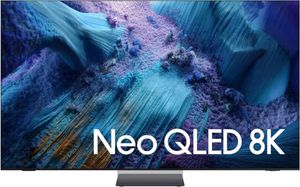
The Samsung QN990F is the pick for great rooms where seating sits 10 feet or more from the wall. At about 74 inches wide, it fills large walls that would make a 60-inch screen look small. Its 8K processor uses 768 AI neural networks to upscale content.
The Wireless One Connect box can sit up to 30 feet away, so your cable box and consoles stay out of sight. Samsung's most advanced anti-glare screen helps with day games, and VRR gaming runs at up to 4K 240Hz.
Top Features
- 8K AI Upscaling Pro: Turns everyday content into sharp, detailed 8K picture.
- Wireless One Connect: Connect devices to a box up to 30 feet from the TV.
- Anti-Glare Screen: Keeps reflections down in sunny rooms.
- Up to 4K 240Hz Gaming: Ultra-smooth motion for fast-paced play.
- Dolby Atmos Sound: Top channels add sound from above the action.
Samsung The Frame Pro LS03HW 65" Black 4K Neo QLED Vision AI Smart TV

The Frame Pro turns your living room wall into a gallery when the TV is off. Art Mode displays pieces from the Art Store or your own photos, and customizable magnetic bezels match your decor. Mini LED lighting gives it bright, Neo QLED picture.
The matte Glare Free screen helps in sunny rooms, and Wireless One Connect keeps cords off the wall. A motion and brightness sensor turns the art on when someone walks in. The SolarCell remote charges with light or USB-C.
Top Features
- Art Mode: Shows artwork or personal photos when you are not watching.
- Glare Free Matte Screen: Reduces reflections in bright rooms.
- Wireless One Connect: Fewer cables for a cleaner wall mount.
- Customizable Bezels: Swap magnetic frames to match your style.
- 144Hz Variable Refresh: Smooth play for games and sports.
Samsung M80H 65" Black 4K Mini LED TV
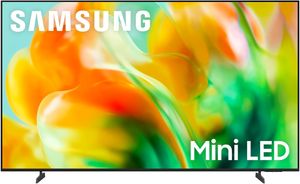
The Samsung M80H is a smart value pick for shoppers moving up from a 60-inch screen. Mini LED backlighting with AI Mode brightens scenes and improves contrast. AI-powered 4K upscaling helps streaming shows and older content look sharp.
Gamers get 144Hz variable refresh and DLG 240Hz for smooth play. One thing to plan for is the stand. It uses feet near the edges, spaced about 39.6 inches apart, so measure your console first or wall mount it with its 200 x 200 VESA pattern.
Top Features
- Mini LED With AI Mode: Brighter picture with richer contrast.
- 4K AI Upscaling: Sharpens lower-resolution content automatically.
- Motion Xcelerator 144Hz: Smooth motion with DLG 240Hz for gaming.
- Gaming Hub: Console, cloud and app games in one place.
- AI Energy Mode: Adjusts brightness to room light to save power.
Finding the Right 60 Inch TV for Your Living Room
The right 60 inch TV starts with a tape measure. Check the distance from your seat, the width of your wall or console, and how you use the room, then decide whether a 60, 65 or larger screen fits best.
When you are ready to compare, visit Spencer's TV & Appliance in the Phoenix area. Our TV experts can show you OLED, Mini LED and Micro RGB models side by side, help you pick the right size, and handle professional delivery, wall mounting and setup. You get local service and real advice from a team that knows Valley homes, not a big-box checkout line.
Frequently Asked Questions About Choosing a 60 Inch TV
A 60 inch TV is about 52 inches wide and 29 to 30 inches tall without the stand. Bezels and stands vary by model, so check the spec sheet before you measure your console.
You should sit about 6 to 8 feet from a 60 inch TV. That range matches the viewing angles recommended by THX and SMPTE, and 4K detail makes the closer end comfortable.
A 60 inch TV is not too big for a small living room if your seat is at least 6 feet from the screen. Closer than about 5 feet, a 50 or 55-inch model will feel more comfortable.
A 65-inch TV is about 5 inches wider and 3 inches taller than a 60-inch TV, with roughly 17 percent more screen area. The gap is easy to notice from 9 feet or more, and 65-inch models also offer far more choice.
A 65 to 75-inch TV is best for seating 8 to 10 feet away. Those sizes fill your view the way viewing-angle guidelines recommend at that distance.
You should mount a 60 inch TV so the center of the screen sits about 40 to 42 inches from the floor. That keeps the picture near seated eye level and avoids neck strain.
Why Trust Spencer’s TV & Appliance?
Since 1973, Spencer’s TV & Appliance has grown to 10 locations throughout the Phoenix Metropolitan Area. The secret to our longevity is simple: personal service. Customer satisfaction has always been the focus of our business, and throughout the years, we have been able to work hard with our suppliers to bring you the best prices. After all, getting customers the best price and personal attention is how we compete with big-box stores, day in and day out.
Not only do we offer top-rated appliances, name-brand electronics, and the best mattresses on the market but we also provide water treatment solutions and perform kitchen design services. Stop by your nearest Spencer’s and see what you’re missing!
Shop at Spencer’s Appliances in Phoenix
At Spencer’s TV & Appliance Stores Phoenix, we provide high-quality, name-brand products at great prices — check out our entire catalog to shop refrigerators, dishwashers, wall ovens, and so much more today. Your friends in the business are always happy to help you find the best kitchen appliances, mattresses, laundry appliances, and electronics for your humble abode, no matter what! Call us, or better yet, search for Spencer's appliances near me and stop by at one of our locations in the Phoenix, Scottsdale, and Glendale regions. Visit us today!
Learn More: Tips for Designing a High-End Kitchen