
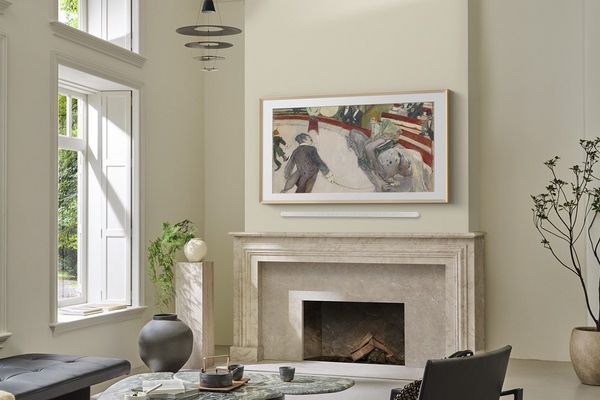
Picture frame TV technology (like The Frame) has completely revolutionized home decor.
When you’re not streaming your favorite movie, your wall transforms into a dynamic canvas displaying stunning, realistic artwork that seamlessly blends into your aesthetic. It’s the ultimate way to eliminate that big, black rectangle from your space.
Ready to turn your home entertainment into a masterpiece? This comprehensive guide shares the essential tips and professional secrets you need to know to make your picture frame TV installation look absolutely flawless.
What Is a Picture Frame TV?
A picture frame TV combines high-performance television with artistic display, seamlessly blending into home decor by mimicking framed artwork.
Key features include an ultra-slim profile, just over an inch thick, for a realistic art-like appearance when mounted flush on the wall. Customizable bezels offer options like black, wood tones, or white to match any decor.
The Samsung Frame TV stands out as the best TV for art display. Its Art Store offers thousands of museum-quality pieces, while Art Mode adjusts brightness to suit ambient lighting. The no-gap wall mount ensures the TV sits flush against the wall, enhancing its framed art illusion.
What to Know Before Installing Your Frame TV
Success starts with good planning, and installing a picture frame TV requires extra consideration compared to a standard TV. Wall placement is key since it serves as both art and entertainment, so viewing angles and lighting must suit both uses.
The best viewing height positions the screen center 57-65 inches from the floor, following art gallery standards for a balanced look and comfortable viewing.
Proper power outlet placement is essential. Outlets should be behind the TV and near the One Connect Box. Adding a recessed wall box during installation ensures a clean, cable-free appearance.
Pre-Installation Checklist:
- Locate wall studs using a stud finder
- Mark desired the TV center point at the proper viewing height
- Ensure power outlets are positioned correctly
- Gather mounting hardware, drill bits, and a level
- Plan a wire concealment strategy
- Test the WiFi signal strength at the installation location
How to Install a Samsung Frame TV (Step-by-Step)
The Samsung frame TV installation requires a precise and systematic approach to ensure professional results. First, carefully unpack all components and verify that your no-gap wall mount for Frame TV hardware is complete.
Step 1: Mark and Measure
Use the provided paper template to mark exact drilling locations. Hold it level, mark each point, and double-check placement by stepping back to view it from a distance.
Step 2: Locate Studs and Drill
Find wall studs with a stud finder, marking their positions. If studs don't align, use heavy-duty toggle bolts. Drill pilot holes carefully, ensuring they're straight and correctly sized.
Step 3: Install Wall Mount
Secure the frame TV wall mount to the wall. Use a level for perfect horizontal alignment – this step is crucial for the final look! Tighten all bolts per the manufacturer's specifications.
Step 4: Connect One Connect Box
Position the One Connect Box in a concealed spot, like a cabinet or behind furniture. This external hub holds all connections, keeping the TV’s ultra-slim profile intact for that artwork illusion.
Step 5: Mount and Align TV
Carefully lift the TV onto the wall mount until it clicks securely. The no-gap design should create a perfectly flush appearance. Make final adjustments to ensure the TV is level and centered.
➜ Learn More: How to Choose the Right Samsung Smart TV Size
Wire Management Tips to Keep Your Frame TV Wall Perfectly Clean
The difference between amateur and professional picture frame TV installations often comes down to wire management. Visible cables break the artwork illusion; concealed wiring creates a seamless, gallery-worthy look.
How to hide wires on a frame TV depends on the wall construction and comfort level with electrical work. The most professional method involves an in-wall rated cable management kit, running cables through the wall cavity between the TV and One Connect Box.
For renters or non-invasive solutions, paintable cord covers offer an excellent alternative. These plastic channels attach to the wall and blend in when painted.
Samsung's One Invisible Connection cable is the premium wire concealment solution. This nearly transparent, 5mm thick cable connects the display panel to the One Connect Box, carrying both power and data through a single, barely visible connection.
Professional Wire Concealment Options:
- In-wall cable management kits (most invisible)
- Paintable surface-mounted cord covers
- One Invisible Connection cable
- Recessed wall box for TV wires (requires electrical work)
- Cable raceways with decorative covers
How to Make Your Frame TV Look Like a Real Painting

Transforming a picture frame TV into convincing artwork requires the right settings and choices. How to make a TV look like a picture frame indistinguishable from the real thing is the primary goal here.
Frame TV art mode settings
Adjust brightness to match room lighting—too bright, and it looks digital. Use the motion sensor to activate the display when someone enters and turn off when the room is empty.
Set the color temperature to warmer tones (around 3000K) for a gallery-like glow. Test these settings at different times of day for the best effect.
Content selection and framing
Choose artwork with mid-tone or darker colors, as overly bright images can appear artificial. Many digital art collections offer images optimized for Frame TVs.
A matte finish screen eliminates reflections, adding to the authenticity. Pair it with a well-chosen bezel to complete the framed artwork look.
Top Frame TVs That Bring Art and Entertainment Together
Discover the top frame TVs that seamlessly blend stunning artwork with premium entertainment, transforming your screen into a masterpiece whether it’s on or off.
Samsung The Frame 65" 4K Ultra HD QLED Art Mode Vision AI Smart TV
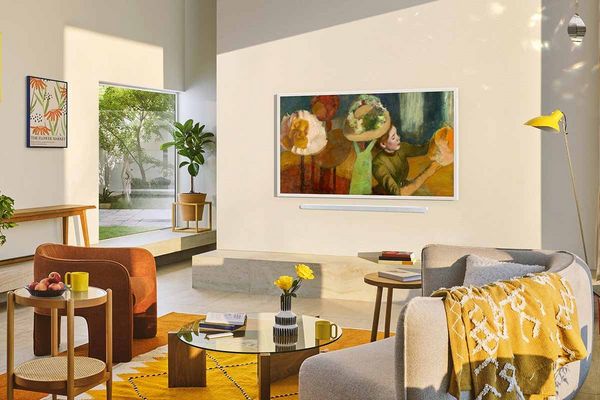
Shop Samsung The Frame 65" 4K Ultra HD QLED Smart TV
This picture frame TV perfectly blends art and tech. It boasts Samsung's QLED panel for vibrant colors and deep contrasts on its impressive 65-inch 4K display.
Vision AI automatically optimizes picture quality, making both artwork and movies look incredible. Its ultra-slim design, just over an inch thick, creates an authentic framed art appearance with the included no-gap wall mount.
Art Mode gives you access to thousands of museum-quality pieces through Samsung's Art Store, and customizable bezels help it fit seamlessly into any decor.
Plus, the matte display eliminates glare, keeping the digital nature hidden. Smart TV capabilities mean all your streaming is at your fingertips without sacrificing the minimalist aesthetic.
Top Features
- QLED technology with Vision AI optimization
- Ultra-slim profile with no-gap wall mounting
- Extensive Art Store with customizable display options
Samsung The Frame Pro 65" 4K Ultra HD Neo QLED Art Mode Vision AI Smart TV
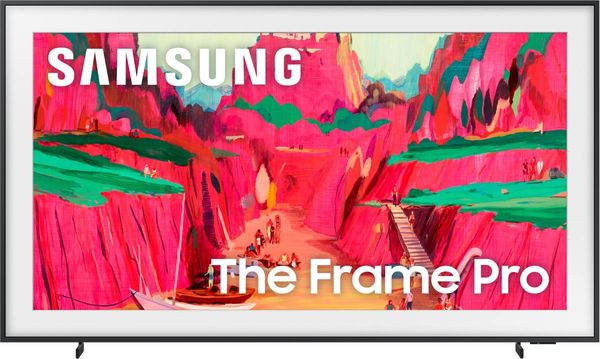
The Samsung Frame Pro takes the picture frame TV concept to the next level with advanced Neo QLED technology and improved processing power.
It offers exceptional brightness, contrast control, and anti-reflection technology, making artwork look vivid and lifelike in any lighting.
The upgraded Vision AI system analyzes and optimizes content for the best viewing experience, while the enhanced Art Mode ensures museum-quality color accuracy.
Professional-grade mounting hardware and the improved One Connect Box make it easy to integrate into your space, combining style and functionality seamlessly.
Top Features
- Neo QLED technology delivers vivid brightness and contrast with anti-reflection coating.
- Vision AI adapts content for optimal quality and color accuracy.
- Premium mounting system ensures perfect wall alignment with expanded connection options.
The Frame Pro blends cutting-edge tech with stunning design, making it the ultimate display for art and entertainment.
What NOT to Do When Installing Your Picture Frame TV
Even skilled DIYers can mess up a picture frame TV installation, risking both safety and looks. Knowing these common errors ensures a professional finish that truly makes your space an art gallery.
Visible Wire Management Mistakes
Leaving cables exposed is a dead giveaway. Unlike standard TVs, picture frame TV installations need total wire hiding to keep the artwork illusion alive. Forget basic cable clips or messy wires that scream "technology."
Incorrect Mounting Height
Mounting these displays at TV height, not artwork height, immediately exposes their electronic nature. Too high means awkward viewing; too low looks odd for art. The ideal spot balances entertainment and proper gallery hanging.
Poor Stud Location Planning
Don't let stud locations dictate TV placement. This often leads to off-center or poorly positioned displays. Use proper toggle bolt anchors when studs don't line up with your ideal spot for both safety and aesthetics.
Inadequate Room Lighting Consideration
Installing a frame TV often overlooks how room lighting impacts the artwork throughout the day. Spots with direct sunlight or harsh artificial light cause glare, breaking the artistic illusion.
Turn Your TV Into a Masterpiece
The evolution from traditional TV to immersive art gallery represents a shift in balancing home entertainment and aesthetics. Picture frame TV technology has advanced so much that the line between digital display and authentic artwork is beautifully blurred.
A successful installation depends on the details. The precision of wall mounting and the subtlety of wire concealment are key to creating the illusion of a curated gallery. Proper installation ensures you'll enjoy artwork that seamlessly transitions into entertainment.
For homeowners ready for this upgrade, professional services like those at Spencers TV & Appliance guarantee optimal results that highlight the potential of picture frame TV technology. This combination of technical skill and aesthetic insight leads to installations that exceed expectations.
Frequently Asked Questions
The cleanest way to connect a Samsung Frame TV is with the One Invisible Connection cable. This thin, nearly transparent cable links the display to the One Connect Box. To make the wires completely disappear, run them through the wall using an in-wall rated cable management kit. A recessed wall box offers the most professional look by hiding all connections inside the wall.
Installing a Samsung Frame TV yourself needs moderate DIY skills and careful planning. Most homeowners can do it with the right tools and patience. The main tasks are precise wall mounting, wire management, and getting that perfectly flush look for the artwork illusion. Use the provided template and measure carefully for a professional finish.
Position the One Connect Box in a hidden spot like a media cabinet or behind furniture. Ensure it’s accessible for cable connections and has proper ventilation to maintain the TV's clean look. Keep the connection cable within the specified length.
For a realistic look, match Art Mode settings to room lighting. Use warmer colors and moderate brightness. Choose artwork with mid-tones or darker colors, ensuring high-resolution and a 16:9 aspect ratio. The matte screen and proper bezel finish the authentic artwork appearance.
Yes, Samsung Frame TVs come with a no-gap wall mount for frame TV. This mount is specifically designed to create a flush appearance, making the artwork illusion more convincing by eliminating shadows and the gap between the TV and the wall.
Yes, picture frame TV models are fully functional smart TVs. They provide access to streaming, cable, and gaming, automatically switching from Art Mode to entertainment mode for excellent picture quality. This dual functionality makes them a practical investment for both entertainment and home decor.
Why Trust Us?
Since 1973, Spencers TV & Appliance has grown to 11 locations throughout the Phoenix Metropolitan Area. The secret to our longevity is simple: personal service. Customer satisfaction has always been the focus of our business, and throughout the years, we have been able to work hard with our suppliers to bring you the best prices. After all, getting customers the best price and personal attention is how we compete with big-box stores, day in and day out.
Not only do we offer top-rated appliances, name-brand electronics, and the best mattresses on the market, but we also provide water treatment solutions and perform kitchen design services. Stop by your nearest Spencers and see what you’re missing!
Shop Picture Frame TVs at Spencers TV & Appliance
At Spencers TV & Appliance, we provide high-quality, name-brand products at great prices — check out our catalog to shop high-end dishwashers today. Your friends in the business are always happy to help you find the best picture frame TV on the market. Call us, or better yet, stop by at one of our locations in the Phoenix, Scottsdale, and Glendale regions. Visit us today!