

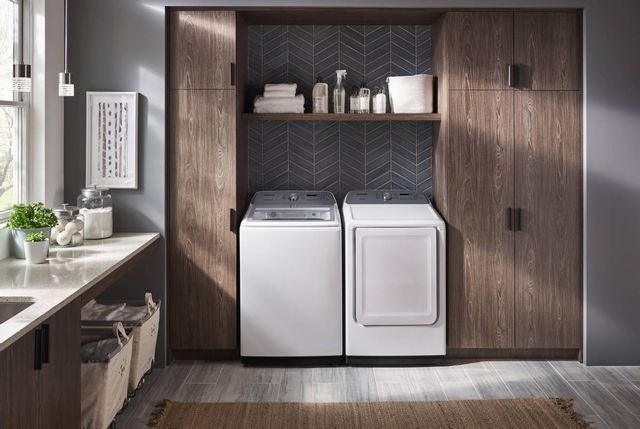
A Samsung dryer that runs but does not heat may have an unheated cycle selected, a restricted exhaust vent, an electrical-supply issue, or a fault that needs professional service. The right next step depends on whether the air stays cold, the dryer warms up but takes too long, or a sensor cycle ends while clothes are damp. Start with the five checks below before assuming the heating element has failed.
Before You Troubleshoot: Know When to Stop
Stop using the dryer if you notice scorching, unusual overheating, smoke, or a burning smell. Do not keep restarting it to see whether the problem clears. If you smell gas, hear a suspected gas leak, or see smoke from a gas dryer, leave the building without operating switches, appliances, or a phone inside. Call emergency services or your gas provider from a safe place outside. For an active fire, evacuate and call emergency services. See Samsung's dryer-odor safety guidance.
For routine cleaning, turn the dryer off, let it cool, and follow its manual. Do not remove cabinet panels, reach into moving parts, test live wiring, bypass a thermal fuse, or disconnect gas fittings. Keep the exhaust properly connected; running a vented dryer with its duct disconnected is not a household troubleshooting step.
Write down the model number, any displayed code, and whether the problem began after installation, a move, or a power interruption. This guide covers conventional vented Samsung electric and gas dryers. Heat-pump or ventless models have different airflow and electrical requirements; use their model-specific instructions.
Compare Samsung Dryers at Spencer's
If replacement makes sense after diagnosis, explore electric and gas models with the capacity, connections, and features your laundry room needs.
Shop Samsung Dryers5 Ways to Troubleshoot a Samsung Dryer That Is Not Heating
1. Check the Cycle and Heat Settings
Air Fluff intentionally tumbles without heat. Eco Dry can also begin with an unheated period, so a cool drum at the start does not automatically mean a broken heater. Check the selected cycle, temperature, and fabric-care label before making changes. Do not use high heat on garments that require low heat or air drying.
When there are no safety warnings or known vent problems, Samsung's no-heat troubleshooting guide uses Time Dry with Eco Dry off to check for warmth after 30 seconds. Stop the cycle, wait for the drum to stop, and assess warmth without touching hot surfaces. If air remains cold, continue with supply and service checks. If it warms, focus on airflow, loading, and sensor behavior.
Cycle names and available settings vary. Samsung's cycle guide distinguishes timed drying from Sensor Dry, which adjusts the cycle according to detected moisture. A very small or mixed-fabric load can behave differently from a full load of similar fabrics.
2. Clean the Lint Screen and Check Accessible Airflow
With the dryer off and cool, remove lint from the screen and reinstall it correctly. Make this part of every load. Look for a crushed or kinked visible exhaust duct without pulling the appliance out or disturbing its connections. Check an easily accessible exterior outlet for obvious obstruction; leave roof vents, internal ductwork, and difficult access to a vent-cleaning professional.
A warm dryer that takes much longer than usual may have restricted airflow rather than a failed heater. Do not compensate for a suspected blockage by repeatedly extending the cycle. Have the full exhaust route cleaned and inspected when needed, and follow the manual's requirements for duct material, length, bends, and clearance.
Some models offer a built-in vent blockage test. Follow your exact manual, starting with a cool, empty drum and a closed door. Samsung's vent-test guide explains that C80/C8 and C90/C9 indicate substantial restriction. They do not identify a bad heating element. If your model lacks the test or a warning persists, arrange professional help. A passing result does not replace routine vent maintenance.
3. Check the Power-Supply Situation for Your Dryer Type
Electric: Conventional U.S. electric Samsung dryers typically need a 240-volt supply. A partial supply failure can leave the motor and display working while the heater does not. If the labeled dryer breaker is safely accessible and there is no damage, burning smell, or other warning, switch the full dryer breaker off for 30 seconds and then on once. If it trips again, leave it off and call a licensed electrician. See Samsung's power-supply troubleshooting guidance.
Gas: A conventional gas dryer needs both its specified electrical supply, commonly 120 volts, and a working gas supply. A turning drum does not establish that gas is reaching the burner. If heat has never worked after installation or a move, ask the installer or a qualified technician to verify the connections. Do not loosen a gas fitting or attempt a burner adjustment.
Use Samsung's installation guidance and your model manual to identify the requirements. Have an electrician handle voltage checks, damaged cords or outlets, and wiring concerns. Do not open the outlet, change cord wiring, or use an adapter to make an incompatible connection fit.
4. Match the Load and Sensor Settings to the Problem
If the dryer gets warm but leaves laundry damp, separate heavy towels from lightweight items and leave room for tumbling. Use Samsung's load-size guidance and the model manual rather than packing the drum tightly. Clothes that come out of the washer unusually wet can also lengthen drying time; check the washer's spin performance before blaming the dryer.
If Sensor Dry ends too soon, locate the moisture-sensor bars using the manual. With the dryer off and cool, Samsung recommends gently cleaning them with a soft cloth and a drop of dish soap. Follow Samsung's sensor-cleaning guidance and the model manual, removing residue and drying the bars before use. A tiny load may not contact the sensors consistently; choose an appropriate timed cycle and fabric-safe temperature instead of assuming the heater is defective.
5. Record Error Codes and Arrange the Right Service
Photograph any code before restarting the dryer. Look it up for your exact model through Samsung Dryer Support. Codes and control combinations are model-dependent, and clearing a code does not repair its cause. Avoid repeated resets that hide a recurring fault. If the display shows dn for a firmware download, do not interrupt power; follow Samsung's error-code instructions.
If basic settings, supply, and vent checks do not explain the lack of heat, stop troubleshooting and request service. Tell the technician whether the dryer never warms, starts warm then cools, ends early, or has never heated since installation. That history helps distinguish an appliance fault from a household supply or installation problem.
Learn more: Dryer Not Heating? 7 Causes and How to Fix
Why a Samsung Dryer Can Run Without Heating
The symptoms below are clues for a service conversation, not proof that a particular part needs replacing. The internal components differ between electric and gas dryers.
| Possible cause | What it can affect | Appropriate next step |
|---|---|---|
| Unheated cycle or Eco Dry phase | Air feels cool even though the dryer is operating as selected. | Check cycle instructions and fabric-safe settings. |
| Restricted exhaust | Heat and moisture do not leave efficiently; drying may slow or protective controls may interrupt heating. | Stop using a blocked dryer and have the vent cleaned and inspected. |
| Electric supply problem | The motor may turn while the electric heating circuit lacks its required supply. | Use the safe breaker check above; recurring trips or installation faults need an electrician. |
| Electric heating element or internal controls | An element, thermostat, sensor, wiring, or protective device may interrupt heat. | A qualified appliance technician must diagnose the circuit and underlying cause. |
| Gas supply or ignition-system fault | The drum may run while the burner does not produce heat. | A qualified gas-appliance technician or installer should inspect the supply and ignition system. |
A thermal fuse is a safety device, not a reset button. Its role and symptoms vary by model. If one has opened, a technician must address the reason for overheating as well as any failed part. Never bridge or bypass it to restore heat.
When Should You Repair or Replace the Dryer?
A no-heat complaint alone does not justify a new dryer. Ask for a diagnosis and written estimate that separates the service visit, parts, and labor. Check warranty coverage, parts availability, the dryer's condition, and its repair history. Compare the estimate with the full replacement cost, including delivery, installation, vent corrections, accessories, and removal of the old appliance.
Replacing a dryer will not correct a blocked household exhaust or faulty electrical supply. Resolve those issues before installing another machine. If you do replace it, confirm fuel type, electrical requirements, dimensions, door clearance, and any stacking-kit compatibility with your installer.
4 Samsung Dryer Models to Compare
These four Samsung models illustrate different capacities and features. Confirm current availability, exact specifications, and installation requirements with Spencer's before ordering. A new model's features do not guarantee that it will never need service.
Samsung 7.5 Cu. Ft. White Electric Dryer
Model #: DVE45B6300W
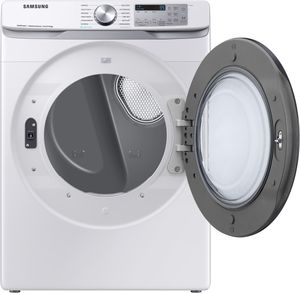
The DVE45B6300W combines a 7.5-cubic-foot drum with Sensor Dry, Steam Sanitize+, and Wi-Fi connectivity. It is an option to compare when you want a front-control electric dryer with connected features.
- 7.5 cu. ft. capacity
- Sensor Dry
- Steam Sanitize+
- Wi-Fi connectivity
Connected features require a compatible wireless network, Samsung account, and SmartThings setup. Check cycle and fabric instructions rather than assuming every setting uses the same temperature. See the Samsung DVE45B6300W specification sheet.
Samsung 7.4 Cu. Ft. White Gas Dryer
Model #: DVG50R5200W
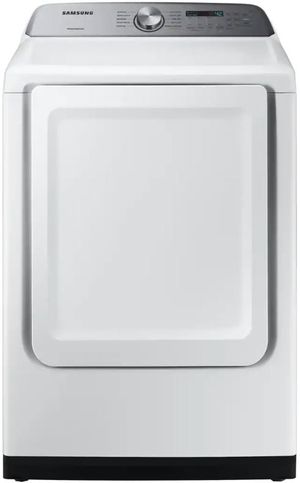
The DVG50R5200W offers a 7.4-cubic-foot capacity, Sensor Dry, 10 preset drying cycles, and five temperature levels. Its rear-control design may suit a side-by-side laundry layout.
- 7.4 cu. ft. capacity
- 10 preset drying cycles
- Sensor Dry
- Smart Care
Smart Care is a troubleshooting feature, not the same as remote cycle control. Confirm the gas and exhaust requirements with a qualified installer. See the Samsung DVG50R5200W specification sheet.
Samsung 7.5 Cu. Ft. Platinum Electric Dryer
Model #: DVE45R6100P
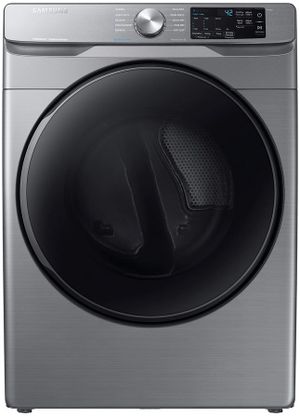
The DVE45R6100P pairs a platinum finish with a 7.5-cubic-foot capacity, Steam Sanitize+, and Sensor Dry. Samsung's specification sheet lists 10 preset cycles and five temperature levels.
- 7.5 cu. ft. capacity
- Steam Sanitize+
- Sensor Dry
- Smart Care
If coordinating it with a washer, verify the exact approved stacking kit and dimensions. Similar-looking laundry appliances are not automatically compatible. See the Samsung DVE45R6100P specification sheet.
Samsung 7.4 Cu. Ft. White Smart Gas Dryer
Model #: DVG52A5500W
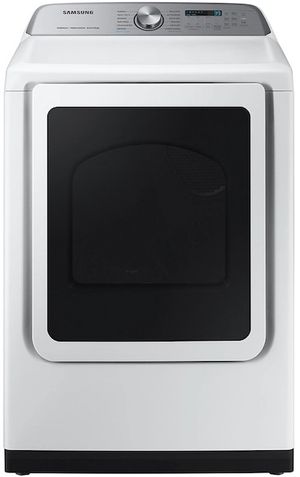
The DVG52A5500W has a 7.4-cubic-foot drum, Steam Sanitize+, Sensor Dry, and five temperature settings. Its 18 total drying cycles comprise 12 preset cycles and six downloadable choices, rather than 18 separate preset selections.
- 7.4 cu. ft. capacity
- 12 preset and 6 downloadable cycles
- Steam Sanitize+
- Wi-Fi monitoring
Samsung specifies monitoring-only connected functionality for this gas model for safety reasons. Do not assume its SmartThings features provide the same remote controls as an electric dryer. See the Samsung DVG52A5500W specification sheet.
Frequently Asked Questions about a Samsung Dryer Not Heating
The selected cycle may be unheated, a conventional electric dryer may have only part of its required power supply, or a supply or internal fault may be preventing heat. A turning drum does not prove that the heating system is working. Use the safe checks above and arrange service if heat does not return.
Restricted airflow, an unsuitable load, or sensor-cycle behavior can leave clothes damp even when heat is present. Clean the lint screen, check the selected cycle, and arrange vent inspection if drying is unusually slow. Do not keep running a dryer with suspected blockage or overheating.
Yes. On models with Eco Dry, part of the cycle can operate without heat. Air Fluff is also an unheated cycle. Check the model's cycle guide before assuming a fault, and use temperatures suitable for the fabric.
Record any error code first and follow the model-specific support instructions. A power cycle may clear a temporary control issue, but it will not repair a blocked vent, damaged wiring, or a failed component. Stop if a breaker trips again or a safety warning appears.
These are internal electrical repairs that require correct diagnosis and safe isolation. Have a qualified technician inspect the dryer and the cause of the failure. Never bypass a fuse or other safety device, and do not test live wiring.
On supported models, these results indicate substantial exhaust restriction. Follow the exact model manual and have the vent system cleaned or corrected. The code does not establish that the heating element is faulty.
Yes. A conventional gas dryer uses electricity for controls and the motor, and gas for the burner. The drum can turn even if the gas supply or ignition system has a problem. Leave gas connections and burner diagnosis to a qualified professional.
Why Trust Spencer's TV & Appliance?
Since 1973, Spencer's TV & Appliance has grown to 11 locations throughout the Phoenix Metropolitan Area. The secret to our longevity is simple: personal service. Customer satisfaction has always been the focus of our business, and throughout the years, we have been able to work hard with our suppliers to bring you the best prices. After all, getting customers the best price and personal attention is how we compete with big-box stores, day in and day out.
Not only do we offer top-rated appliances, name-brand electronics, and the best mattresses on the market but we also provide water treatment solutions and perform kitchen design services. Stop by your nearest Spencer's and see what you’re missing!
Shop Samsung Dryers at Spencer's
At Spencer's TV & Appliance, we provide high-quality, name-brand products at great prices — check out our catalog to shop Samsung dryers online today. Your friends in the business are always happy to help you find the best dryer for your home. Call us, or better yet, stop by at one of our locations in the Phoenix, Scottsdale, and Glendale regions. Visit us today!